
How to Grow Your YouTube Channel for Free?
YouTube growth is brutally slow in the beginning. You pour hours into filming and editing, only to hit publish and end up with 10 views a week later.
Many creators assume the only way out of this is a massive marketing budget. But, throwing money at ads is useless if your channel’s foundation is weak.
In this blog, we will explain how to grow your YouTube channel from scratch using free resources.
5 Ways To Grow Your YouTube Channel for Free
Here are five practical ways to help you build steady growth for your channel:
1. Sub4Sub
Sub4Sub is often the first shortcut new creators try. Check out how it works:
- You subscribe to other channels
- They subscribe back
- People use apps, groups, or forums to exchange subs
Not to mention, it’s completely free, and you can receive real subscribers. At first, it feels exciting because numbers grow quickly and your channel looks more credible to new visitors.
But there are serious downsides:
- Most subscribers never watch your videos
- Watch time drops, hurting reach
- YouTube may stop recommending your content
So, use this method very carefully and, if possible, stop this once you receive a natural influx of viewers.
Want an authentic way to gain high-quality subscribers? Buy real YouTube subscribers from us now!
2. Use Free AI Tools to Grow Faster
Free AI tools can save time and help you make better content decisions. They are especially useful when you are just starting out. Have a look at the best free tools for YouTube content creation:
- Vidiq
Helps you find basic keywords, check video scores, and understand what’s trending in your niche. It’s good for getting quick ideas and improving titles.
- TubeBuddy
It’s useful for simple SEO tasks like tag suggestions, basic optimization tips, and quick checks on your uploads. The tool is really easy to use, even for beginners.
- TubePilot AI
My personal favorite is TubePilot AI. It offers a massive suite of premium-grade tools completely for free, without the annoying paywalls.
Here are the three TubePilot tools I use every single week:
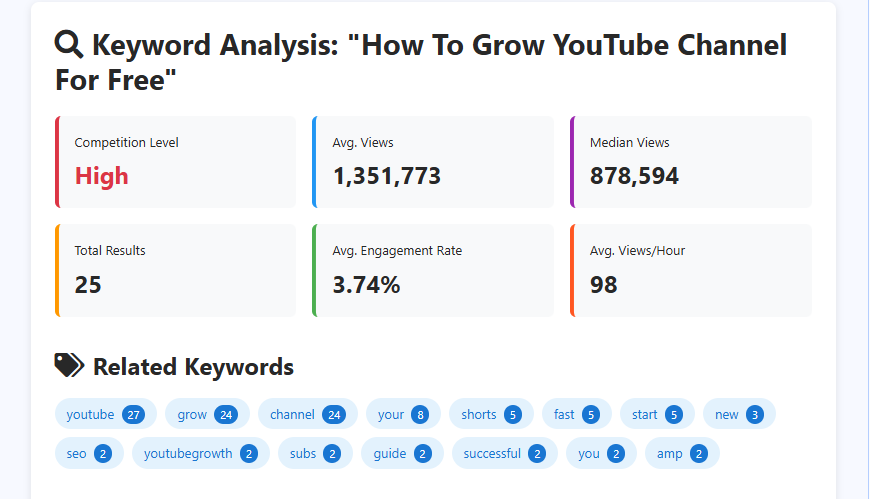
- YouTube Keyword Research: Just type in the target keyword and hit the analyze button. Within seconds, you will get the competition level, average views, median views, total number of videos targeting this keyword, average engagement rate of these videos, and average views per hour. You will even get tailored SEO suggestions to get ranked for this keyword.
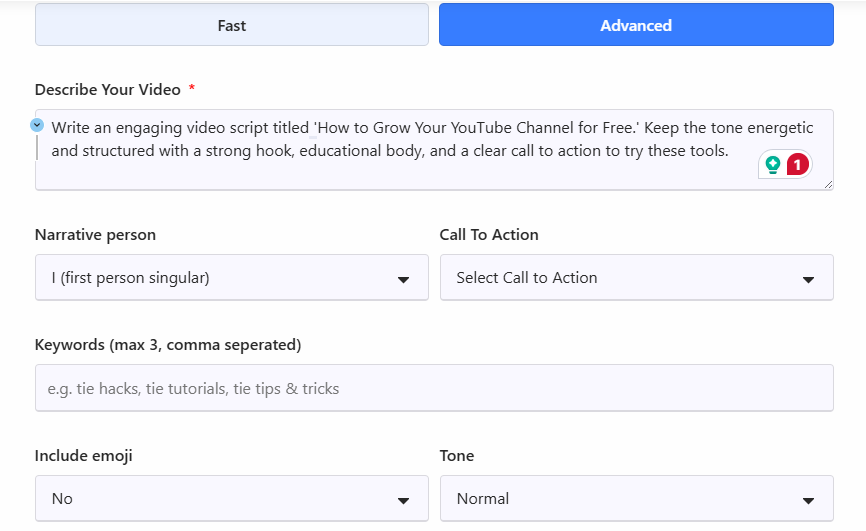
- Video Script Generator: Writer’s block is a huge time-waster. This tool automatically structures your entire video for you. You just need to input a prompt on what you need, narration technique, CTA, target keywords, tone, and if emojis are to be included or not.
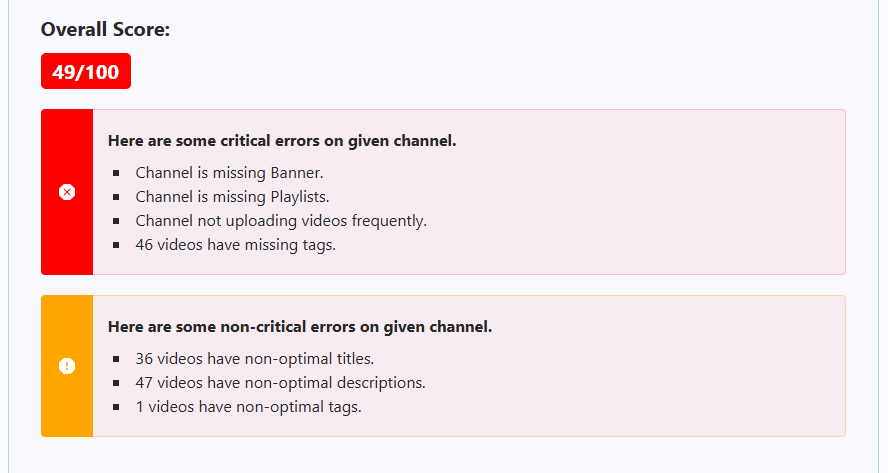
- YouTube Channel Audit: Just drop in your channel URL. This tool scans your content to give an overall score and identifies exactly what is holding you back, whether it’s missing descriptions, poor tagging, or inconsistent uploads, so you can fix it instantly. You can even view the views, likes, comments, and even engagement rate.
3. Optimize For Session Time
We often worry about how long people watch one video. However, Paddy Galloway’s analysis of the viral channel “Beluga” reveals that Session Time (the total time a viewer spends on YouTube because of you) is far more important.
Here’s how to improve the session time:
- Create connected content around one topic cluster so that it’s easy to link them together at the end of each video. You can also create YouTube Shorts on these topics to drive traffic from the Shorts feed, too.
- To keep viewers in a ‘binged’ state, you must keep their brains active. Use sound effects or audio changes every few seconds. This prevents the viewer from clicking away, leading them to watch 3 or 4 of your videos in a row.
- Leave something very hooky at the end of video to let the viewer watch the next video.
Also Read: Does Shorts Counts Towards Watch Hour?
4. Present Authentic Content Realistically
There is a massive shift happening on YouTube right now where ‘normal’ people are blowing up by doing less. Gabe Bult explains that viewers are becoming sick of over-produced, “MrBeast-style” editing and crave original experiences.
Channels like Timothy Ward or Alexandra are getting hundreds of thousands of views with almost no B-roll, no music, and no complex scripts. So, instead of spending 8 hours editing, spend that time having a unique experience or learning something, and then just sit in front of the camera and share it.
5. Color-Swap Competitor Analysis
You have likely heard ‘study your competitors’, but Romayroh suggests a more aggressive and specific tactic for thumbnails that requires zero brainstorming. Here’s how to do it:
- Go to a top competitor in your niche and look at their most successful videos. Identify a specific element they use repeatedly in thumbnails (e.g., a bright red arrow on the left side).
- Copy the composition exactly, but change one variable. If they use a red arrow, you use a blue arrow.
- You are leveraging a composition that is scientifically proven to get clicks in your niche, but the slight color change makes it unique to you so it doesn’t look like a direct rip-off.
Watch the full video here:
Conclusion
The algorithm is actually a feedback loop. You now possess the blueprint to manipulate that loop in your favor.
But remember, data without execution is just noise. So, stop polishing your plans and start publishing your work.
The only way to fail now is to stay silent. Go hit upload!
Leave a Reply
Want to join the discussion?Feel free to contribute!