
Do Shorts Count Towards Watch Hours?
You see your Shorts views climbing. Thousands of people are watching, and your analytics look great. But when you check your Earn tab in YouTube Studio, that watch hour meter barely moves.
Now, let’s start with the hard truth: No, watch time from the YouTube Shorts Feed does not count toward the 4,000 public watch hours needed for monetization.
Does that mean Shorts are a waste of time? Absolutely not. YouTube actually gives you a separate path to get monetized strictly through Shorts. Plus, if you play your cards right, you can use those 60-second clips to skyrocket your long-form watch time.
Check out how the math works and how to fix your strategy.
What Are YouTube Watch Hours?
YouTube Watch Hours are simply the total amount of time viewers spend watching your videos. They show how engaging your content is and how long viewers stay on your channel.
Do YouTube Shorts Count Towards Watch Hours?
Short answer: No.
Even though Shorts watch time appears inside your Total Watch Time in YouTube Analytics, it does not count toward the 4,000 public watch hours needed for monetization.
There is one loophole, but don’t rely on it. If a viewer watches your Short outside of the Shorts Feed, it does count. For example:
- They watch it on the YouTube TV app.
- They click the video specifically from your Channel Page on a desktop.
In these specific cases, the Short plays like a regular video with a seek bar, so the time counts. However, this usually makes up less than 1% of your total traffic, so it won’t move the needle significantly.
Why YouTube Shorts Don’t Count Towards Watch Hours
You might have checked your main Analytics dashboard and seen a massive number like 500 hours, only to click the Earn tab and see 10 hours. It is frustrating, but here is why that gap exists.
- YouTube keeps two separate scoreboards. Your Total Watch Time in Analytics counts everything: private videos, unlisted clips, deleted videos, and yes, Shorts. However, the Public Watch Hours in the Earn tab are strict. It only counts valid YouTube views on long-form content. The Earn tab is the only scoreboard that actually matters for getting paid.
- The vast majority of Shorts views come from the Shorts Feed (that endless vertical scroll where users swipe up to see the next video). YouTube deliberately excludes these swipe views from the 4,000-hour goal. Since the viewing behavior is passive (random scrolling) rather than active (clicking a thumbnail), YouTube does not weigh it the same as long-form engagement.
Two Ways For YouTube Monetization
So, where do YouTube Shorts watch hours actually go?
Well, it goes into a completely separate bucket designed just for short-form creators. In fact, the platform created two distinct doors to enter the YouTube Partner Program (YPP):
1. Long-Form Video Route
This path is built for storytellers, educators, and vloggers who make standard horizontal videos. YouTube wants to see that you can keep an audience’s attention for long periods.
- Subscribers: 1,000
- Metric: 4,000 Public Watch Hours
- Time Limit: In the last 365 days
In this video, Dan clearly explains how to cross the 4,000 watch hour requirement in the easiest way:
2. Shorts Route
This path is built for creators who focus mainly on Shorts. Since watch hours don’t count here, YouTube measures pure volume instead.
- Subscribers: 1,000
- Metric: 10 Million valid Shorts Views
- Time Limit: In the last 90 days
Want to know how much you can earn from Shorts? Check out our blog on how much does YouTube Shorts pay.
How to Use Shorts to Actually Grow Watch Hours
Shorts don’t add to your 4,000 watch hours directly. But if used correctly, they can push viewers toward your long videos and grow your channel.
Have a look at some strategies that actually work for it:
1. Leverage The Related Video Feature
Links in pinned comments on Shorts aren’t clickable! You must use YouTube’s Related Video feature:
- Go to YouTube Studio on your desktop. Select Content Section.
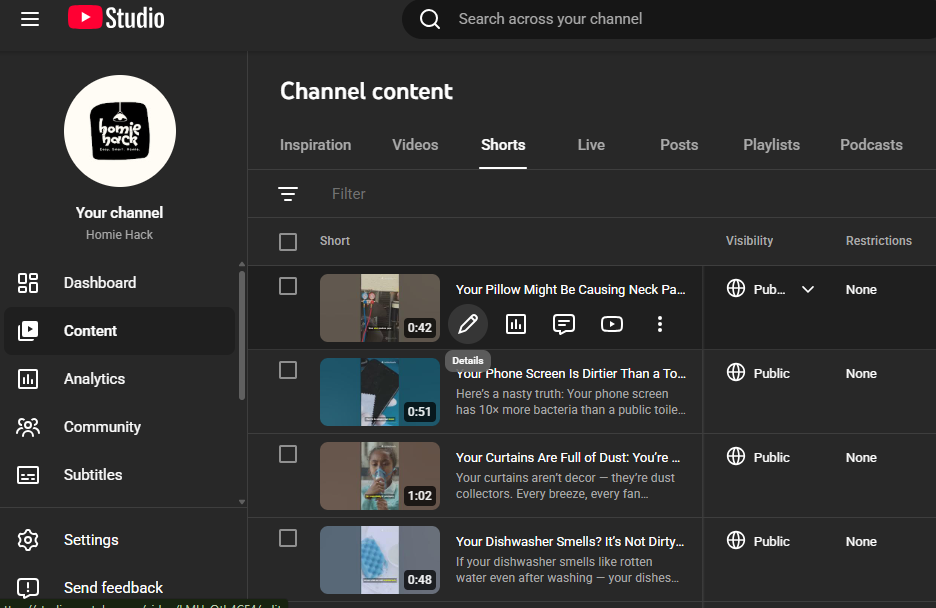
- Open the details of your Short.
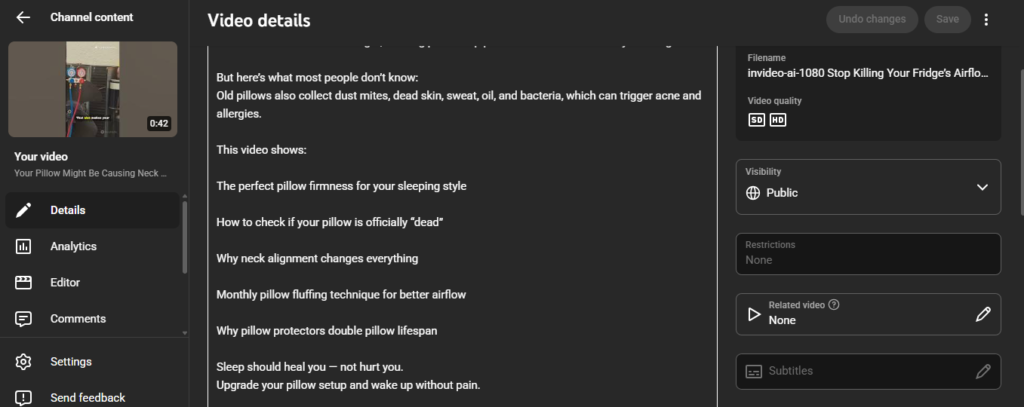
- Look for the Related Video tab on the right sidebar.
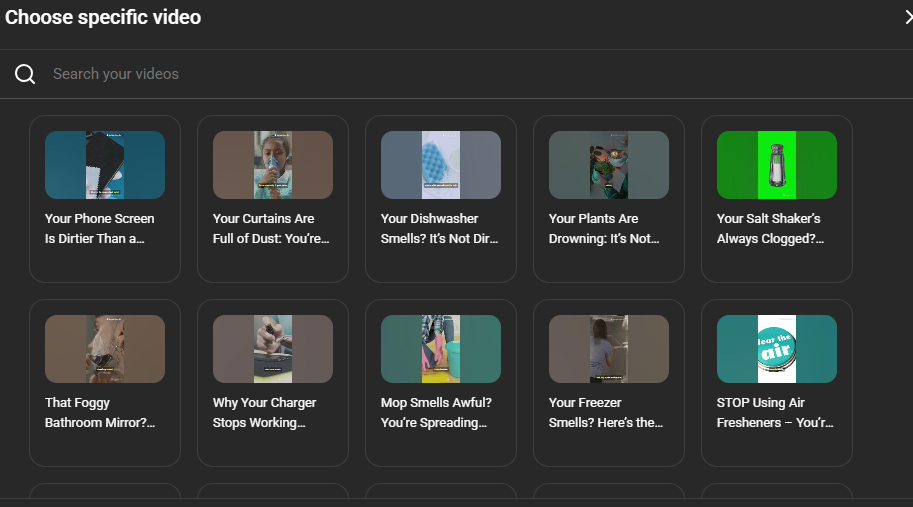
- Link it to your long-form video.
Now, a clickable play button appears directly on the Short screen (right under your handle).
2. Use a Cliffhanger Cut
Don’t give away the ending in the Short. If you show the final result, the viewer has no reason to click through. Instead, cut the Short right before the big reveal. Then, verbally tell them, “Watch the full breakdown here” while pointing to the Related Video link.
3. Use a Visual CTA
Viewers are often blind to interface buttons because they are focused on your face. In your editing software, add a sticker or a graphic arrow that points exactly to where the Related Video button sits on the screen (bottom right, near the channel name). Time this arrow to pop up exactly when you ask them to watch the full video.
4. Community Post Rehook
When a Short starts getting views, immediately go to your Community Tab and post the thumbnail of the long-form video you want to push. Add a poll or a question related to that viral Short. Since your Short viewers are currently active on your channel, YouTube is more likely to show them your Community Post. This catches the people who scrolled past the Related Video link but are still interested in the topic.
Conclusion
The answer is a hard no: the hours you get from the Shorts feed will never fill up that 4,000-hour bar. YouTube has drawn a strict line between scrolling and watching, and those rules aren’t likely to change soon.
But getting stuck on this rule is a mistake. YouTube gives you massive reach with Shorts. All you need to do is manually move those viewers over to the videos that actually matter for monetization.
Leave a Reply
Want to join the discussion?Feel free to contribute!