You can upload great videos on YouTube and still get low views. That’s not always because of content quality. In many cases, it’s because your YouTube settings are working against you.

Most creators focus on titles, thumbnails, and hashtags. But very few check the small settings inside YouTube Studio that directly affect reach and recommendations. One wrong toggle can limit who sees your video.

In this blog, we will explain the exact YouTube settings you need to flip right now to get more eyes on your content.

Best YouTube Settings To Get More Views

Let’s fix your channel right now with these essential tweaks.

1. Stop The Instant Publish Mistake

    Are you clicking Public the second your video finishes uploading? Stop!

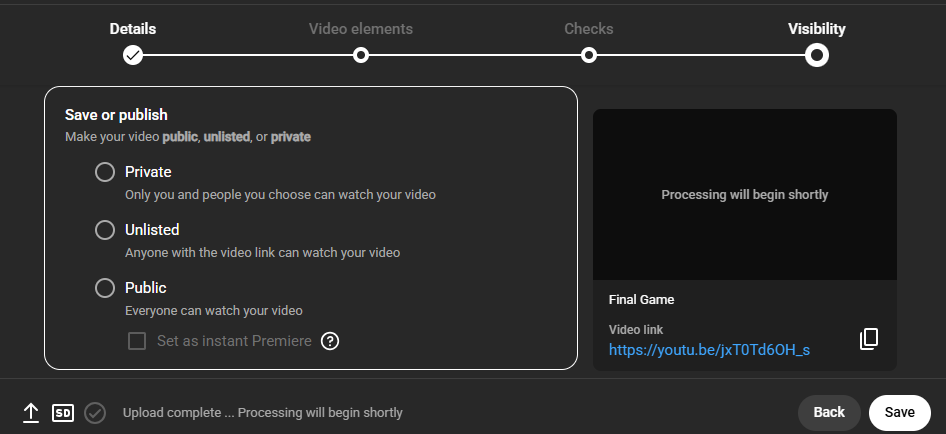
    Most creators make the mistake of publishing immediately. Instead, you should upload your video as Unlisted or Private first.

    Why? Well, there are two reasons:

    • According to content creation expert Shane Hummus, YouTube’s AI needs time to read your video to determine exactly what it is about and if it is safe to promote. For new channels specifically, YouTube dedicates fewer resources, so this reading process takes longer (24–48 hours). Check out his complete video here:
    • Just like this quality check time, YouTube needs time for rendering too. YouTube often makes the Standard Definition (low quality) version available first while it processes the High Definition (HD) or 4K version in the background.

    So, upload your video and let it sit in Private or Unlisted mode for 2 days. This gives the algorithm time to scan it and trust it, so when you finally flip the switch to Public, it’s ready to be pushed to people.

    2. Made for Kids Trap

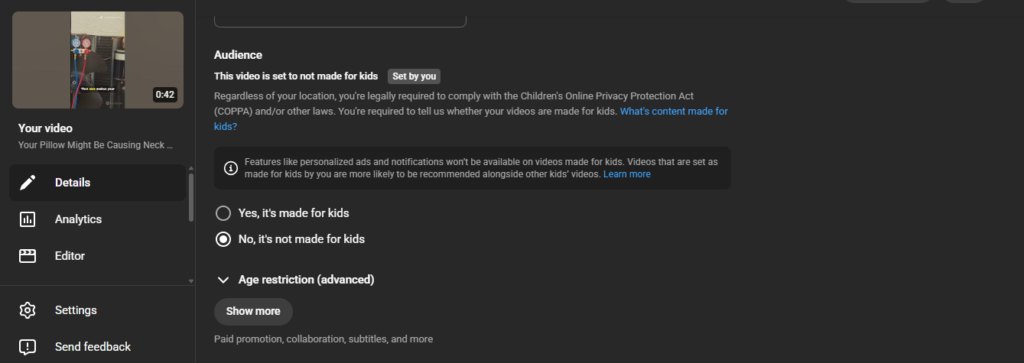
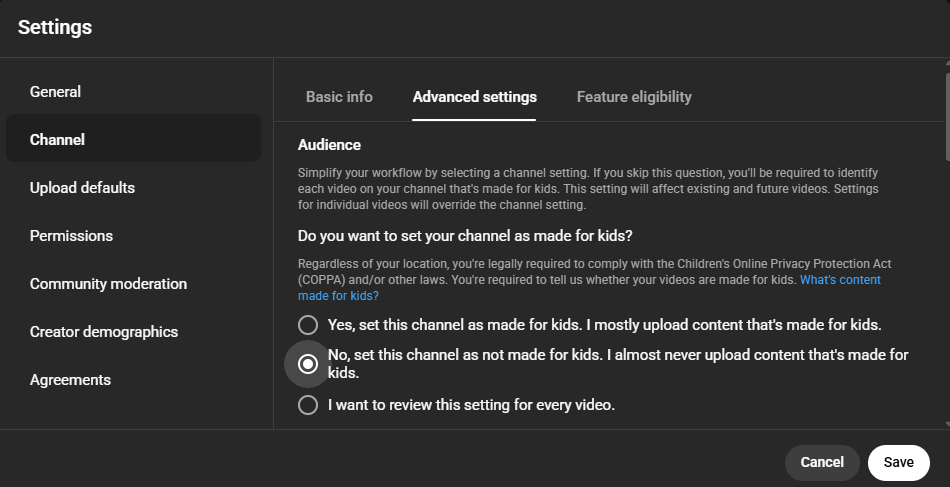
      This is the fastest way to kill your YouTube channel’s growth if you get it wrong. In your upload settings, you will see a question: “Is this video made for kids?”

      Unless you are literally making nursery rhymes or unboxing toys for toddlers, always select NO.

      If you select Yes, YouTube treats you like a babysitter. They disable your comments, turn off the notification bell, and stop showing personalized ads. This destroys your engagement and revenue.

      If you don’t want to see this setting while uploading each video, you can disable it permanently:

      • Go to Settings in YouTube Studio
      • Select Channel and Advanced Settings
      • Set it to “No, set this channel as not made for kids” by default

      3. Rename Your Raw File

        Before you even upload your video file to YouTube, look at the file name on your computer.

        Rename the file to match your video title exactly, for example: how-to-bake-a-cake.mp4. This helps with SEO (Search Engine Optimization). It tells YouTube what your video is about before the upload even finishes.

        4. Tell YouTube Who You Are

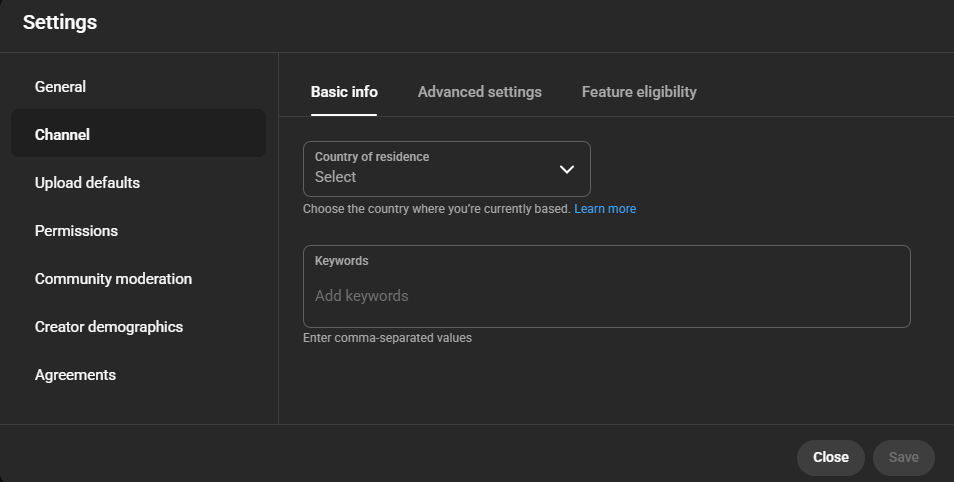
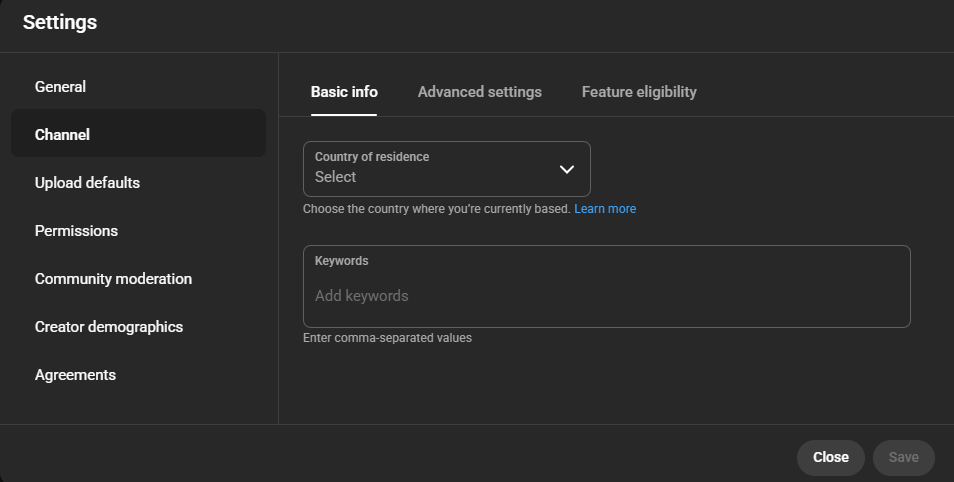
          If you are a new channel, YouTube doesn’t know who to show your videos to. You need to give them a hint using Channel Keywords. Here’s how to set them up:

          • Go to Settings
          • Select Channels and enter your niche-specific terms in the keywords section of Basic Info

          You can also add the names of big competitors in your niche to these keywords. This helps the algorithm understand that your audience is similar to theirs.

          5. Altered Content Switch

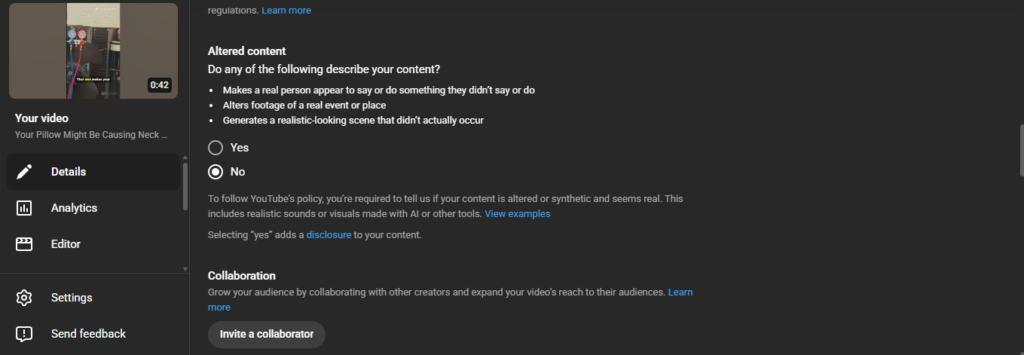
            YouTube recently added a new setting regarding AI. When you upload, look for the Altered content question.

            If you are a normal creator making real videos, make sure you click NO.

            If you click Yes when you don’t need to, you are telling YouTube your video is synthetic or fake, which can hurt your reach. Only click Yes if you are using AI to fake real people or events.

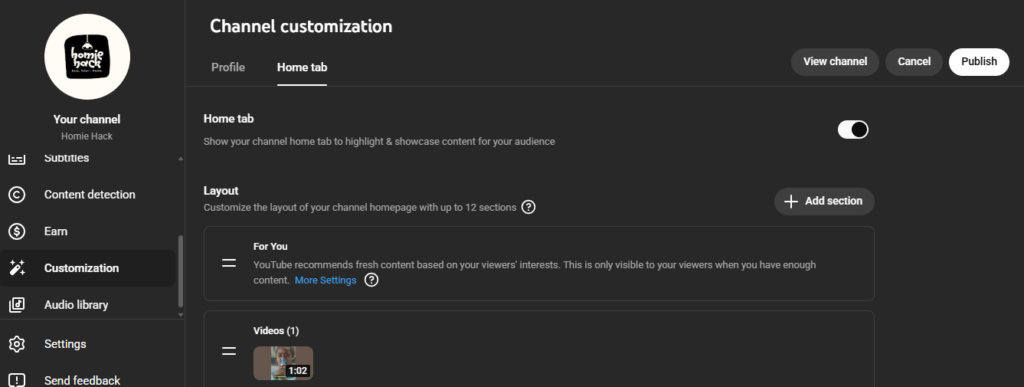
            6. Customize Your Home Tab

              When a viewer clicks on your channel name, what do they see? If it looks messy, they won’t subscribe.

              So, click on the Customization section on YouTube Studio and select Layout. You must:

              • Put your Popular Videos section at the very top. Show off your best work first to hook new visitors!
              • Arrange your Recent Uploads underneath that.

              This layout makes your channel look professional and binge-worthy immediately.

              7. Subscriber Burnout Button

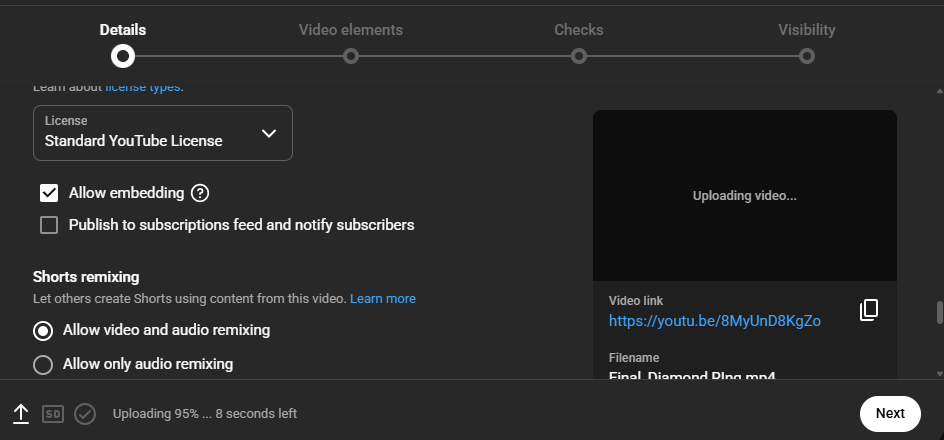
                In your video details, scroll down to the bottom and find the box that says “Publish to subscriptions feed and notify subscribers.”

                Usually, you keep this checked. BUT, if you are posting a video that is totally different from your usual content (like a Spider-Man video on a Star Wars channel), uncheck it.

                If you show a video to your YouTube subscribers that they hate, they won’t click it. This sends a signal to YouTube that your video is bad, and the algorithm will stop promoting it to everyone else.

                Want to know more YouTube settings that increases your views? Check this video:

                Frequently Asked Questions (FAQs)

                1. Does changing my video settings after uploading affect my views? 

                Yes, but mostly for future reach. Even though tweaking tags or descriptions can help the algorithm re-index your video, major settings like ‘Notify Subscribers’ can’t be resent once the video is live.

                1. What is the single most important setting for YouTube SEO? 

                The Video Category and Language settings are the most important settings. They act as a compass for YouTube, telling the platform exactly who your video is for so it doesn’t waste impressions on people who won’t click.

                1. Will using the ‘Allow Embedding’ setting help me get more views? 

                Absolutely. Keeping this checked allows other websites and blogs to share your video, which increases your views. Every time someone watches your video on another site, it still counts as a view on your channel!

                Also Read: Do Shorts Counts Towards Watch Hours?

                Conclusion

                Most gurus talk about the algorithm like it’s some shadow monster designed to bury your content. That’s just wrong.

                The algorithm is actually your biggest employee, and it works for free. Its only job is to find the right audience for your videos so people stay on the platform.

                But it needs the right guidance to do the job, and you can point it in the right direction with the correct settings. The moment you fix the basics like audience selection, subtitles, upload defaults, engagement options, and SEO settings, you make things easier for the algorithm. That’s exactly what keeps your channel growing!

                YouTube growth is brutally slow in the beginning. You pour hours into filming and editing, only to hit publish and end up with 10 views a week later. 

                Many creators assume the only way out of this is a massive marketing budget. But, throwing money at ads is useless if your channel’s foundation is weak.

                In this blog, we will explain how to grow your YouTube channel from scratch using free resources.

                5 Ways To Grow Your YouTube Channel for Free

                Here are five practical ways to help you build steady growth for your channel:

                1. Sub4Sub

                Sub4Sub is often the first shortcut new creators try. Check out how it works:

                • You subscribe to other channels
                • They subscribe back
                • People use apps, groups, or forums to exchange subs

                Not to mention, it’s completely free, and you can receive real subscribers. At first, it feels exciting because numbers grow quickly and your channel looks more credible to new visitors.

                But there are serious downsides:

                • Most subscribers never watch your videos
                • Watch time drops, hurting reach
                • YouTube may stop recommending your content

                So, use this method very carefully and, if possible, stop this once you receive a natural influx of viewers. 

                Want an authentic way to gain high-quality subscribers? Buy real YouTube subscribers from us now!

                2. Use Free AI Tools to Grow Faster

                Free AI tools can save time and help you make better content decisions. They are especially useful when you are just starting out. Have a look at the best free tools for YouTube content creation:

                1. Vidiq

                Helps you find basic keywords, check video scores, and understand what’s trending in your niche. It’s good for getting quick ideas and improving titles.

                1. TubeBuddy

                It’s useful for simple SEO tasks like tag suggestions, basic optimization tips, and quick checks on your uploads. The tool is really easy to use, even for beginners.

                1. TubePilot AI

                My personal favorite is TubePilot AI. It offers a massive suite of premium-grade tools completely for free, without the annoying paywalls.

                Here are the three TubePilot tools I use every single week:

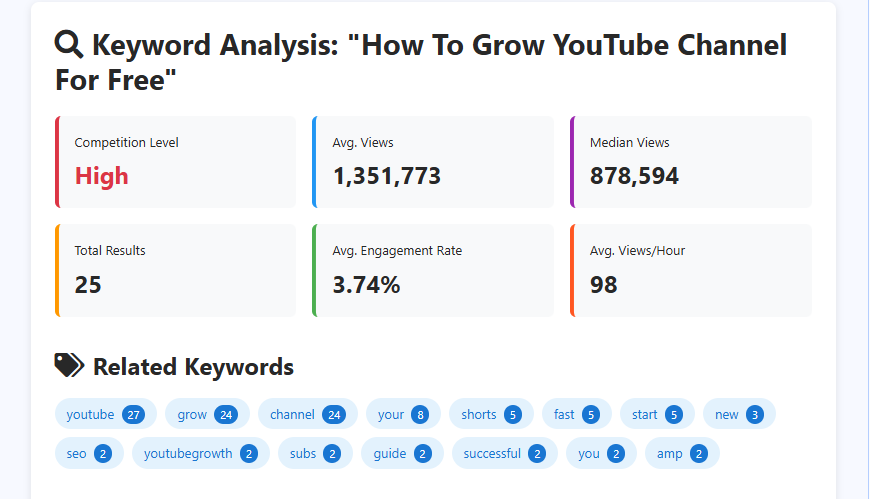
                • YouTube Keyword Research: Just type in the target keyword and hit the analyze button. Within seconds, you will get the competition level, average views, median views, total number of videos targeting this keyword, average engagement rate of these videos, and average views per hour. You will even get tailored SEO suggestions to get ranked for this keyword.
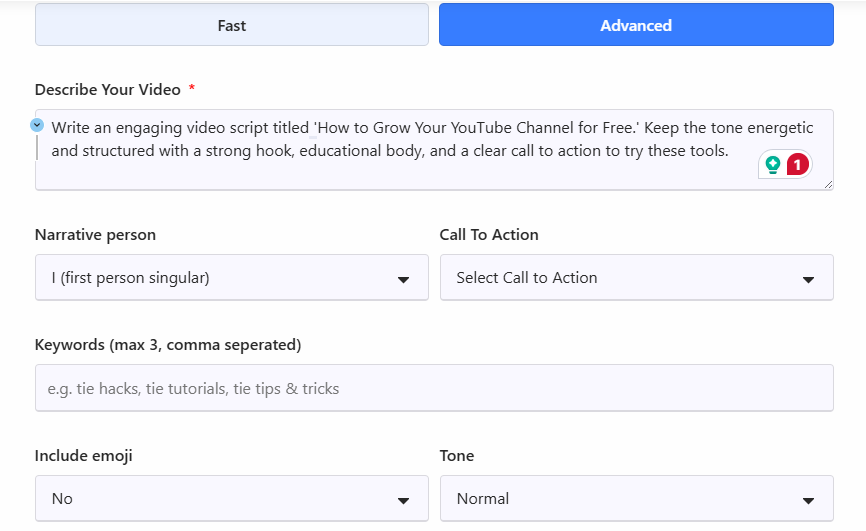
                • Video Script Generator: Writer’s block is a huge time-waster. This tool automatically structures your entire video for you. You just need to input a prompt on what you need, narration technique, CTA, target keywords, tone, and if emojis are to be included or not.
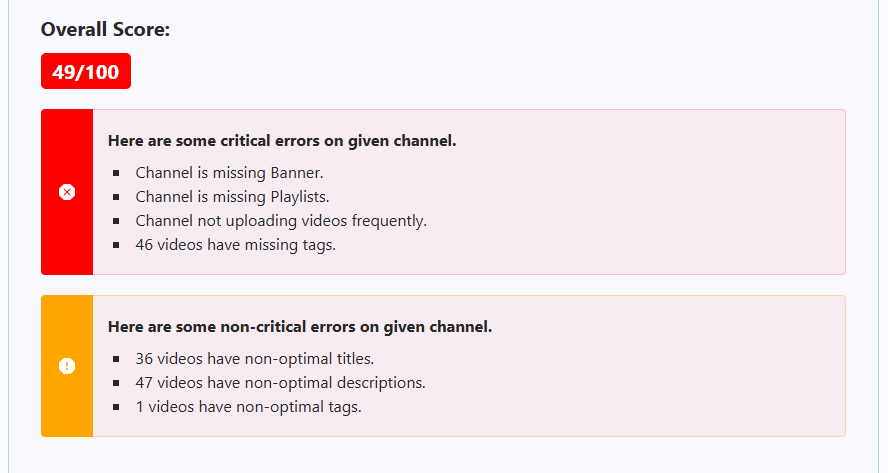
                • YouTube Channel Audit: Just drop in your channel URL. This tool scans your content to give an overall score and identifies exactly what is holding you back, whether it’s missing descriptions, poor tagging, or inconsistent uploads, so you can fix it instantly. You can even view the views, likes, comments, and even engagement rate. 

                3. Optimize For Session Time

                We often worry about how long people watch one video. However, Paddy Galloway’s analysis of the viral channel “Beluga” reveals that Session Time (the total time a viewer spends on YouTube because of you) is far more important. 

                Here’s how to improve the session time:

                • Create connected content around one topic cluster so that it’s easy to link them together at the end of each video. You can also create YouTube Shorts on these topics to drive traffic from the Shorts feed, too.
                • To keep viewers in a ‘binged’ state, you must keep their brains active. Use sound effects or audio changes every few seconds. This prevents the viewer from clicking away, leading them to watch 3 or 4 of your videos in a row.
                • Leave something very hooky at the end of video to let the viewer watch the next video.

                Also Read: Does Shorts Counts Towards Watch Hour?

                4. Present Authentic Content Realistically

                There is a massive shift happening on YouTube right now where ‘normal’ people are blowing up by doing less. Gabe Bult explains that viewers are becoming sick of over-produced, “MrBeast-style” editing and crave original experiences.

                Channels like Timothy Ward or Alexandra are getting hundreds of thousands of views with almost no B-roll, no music, and no complex scripts. So, instead of spending 8 hours editing, spend that time having a unique experience or learning something, and then just sit in front of the camera and share it.

                5. Color-Swap Competitor Analysis

                You have likely heard ‘study your competitors’, but Romayroh suggests a more aggressive and specific tactic for thumbnails that requires zero brainstorming. Here’s how to do it:

                • Go to a top competitor in your niche and look at their most successful videos. Identify a specific element they use repeatedly in thumbnails (e.g., a bright red arrow on the left side).
                • Copy the composition exactly, but change one variable. If they use a red arrow, you use a blue arrow. 
                • You are leveraging a composition that is scientifically proven to get clicks in your niche, but the slight color change makes it unique to you so it doesn’t look like a direct rip-off.

                Watch the full video here:

                Conclusion

                The algorithm is actually a feedback loop. You now possess the blueprint to manipulate that loop in your favor. 

                But remember, data without execution is just noise. So, stop polishing your plans and start publishing your work. 

                The only way to fail now is to stay silent. Go hit upload!

                You see your Shorts views climbing. Thousands of people are watching, and your analytics look great. But when you check your Earn tab in YouTube Studio, that watch hour meter barely moves.

                Now, let’s start with the hard truth: No, watch time from the YouTube Shorts Feed does not count toward the 4,000 public watch hours needed for monetization.

                Does that mean Shorts are a waste of time? Absolutely not. YouTube actually gives you a separate path to get monetized strictly through Shorts. Plus, if you play your cards right, you can use those 60-second clips to skyrocket your long-form watch time.

                Check out how the math works and how to fix your strategy.

                What Are YouTube Watch Hours?

                YouTube Watch Hours are simply the total amount of time viewers spend watching your videos. They show how engaging your content is and how long viewers stay on your channel.

                Do YouTube Shorts Count Towards Watch Hours?

                Short answer: No.

                Even though Shorts watch time appears inside your Total Watch Time in YouTube Analytics, it does not count toward the 4,000 public watch hours needed for monetization.

                There is one loophole, but don’t rely on it. If a viewer watches your Short outside of the Shorts Feed, it does count. For example:

                • They watch it on the YouTube TV app.
                • They click the video specifically from your Channel Page on a desktop.

                In these specific cases, the Short plays like a regular video with a seek bar, so the time counts. However, this usually makes up less than 1% of your total traffic, so it won’t move the needle significantly.

                Why YouTube Shorts Don’t Count Towards Watch Hours

                You might have checked your main Analytics dashboard and seen a massive number like 500 hours, only to click the Earn tab and see 10 hours. It is frustrating, but here is why that gap exists.

                • YouTube keeps two separate scoreboards. Your Total Watch Time in Analytics counts everything: private videos, unlisted clips, deleted videos, and yes, Shorts. However, the Public Watch Hours in the Earn tab are strict. It only counts valid YouTube views on long-form content. The Earn tab is the only scoreboard that actually matters for getting paid.
                • The vast majority of Shorts views come from the Shorts Feed (that endless vertical scroll where users swipe up to see the next video). YouTube deliberately excludes these swipe views from the 4,000-hour goal. Since the viewing behavior is passive (random scrolling) rather than active (clicking a thumbnail), YouTube does not weigh it the same as long-form engagement.

                Two Ways For YouTube Monetization

                So, where do YouTube Shorts watch hours actually go?

                Well, it goes into a completely separate bucket designed just for short-form creators. In fact, the platform created two distinct doors to enter the YouTube Partner Program (YPP):

                1. Long-Form Video Route

                  This path is built for storytellers, educators, and vloggers who make standard horizontal videos. YouTube wants to see that you can keep an audience’s attention for long periods.

                  • Subscribers: 1,000
                  • Metric: 4,000 Public Watch Hours
                  • Time Limit: In the last 365 days

                  In this video, Dan clearly explains how to cross the 4,000 watch hour requirement in the easiest way:

                  2. Shorts Route

                    This path is built for creators who focus mainly on Shorts. Since watch hours don’t count here, YouTube measures pure volume instead. 

                    • Subscribers: 1,000
                    • Metric: 10 Million valid Shorts Views
                    • Time Limit: In the last 90 days

                    Want to know how much you can earn from Shorts? Check out our blog on how much does YouTube Shorts pay.

                    How to Use Shorts to Actually Grow Watch Hours

                    Shorts don’t add to your 4,000 watch hours directly. But if used correctly, they can push viewers toward your long videos and grow your channel.

                    Have a look at some strategies that actually work for it:

                    1. Leverage The Related Video Feature 

                      Links in pinned comments on Shorts aren’t clickable! You must use YouTube’s Related Video feature:

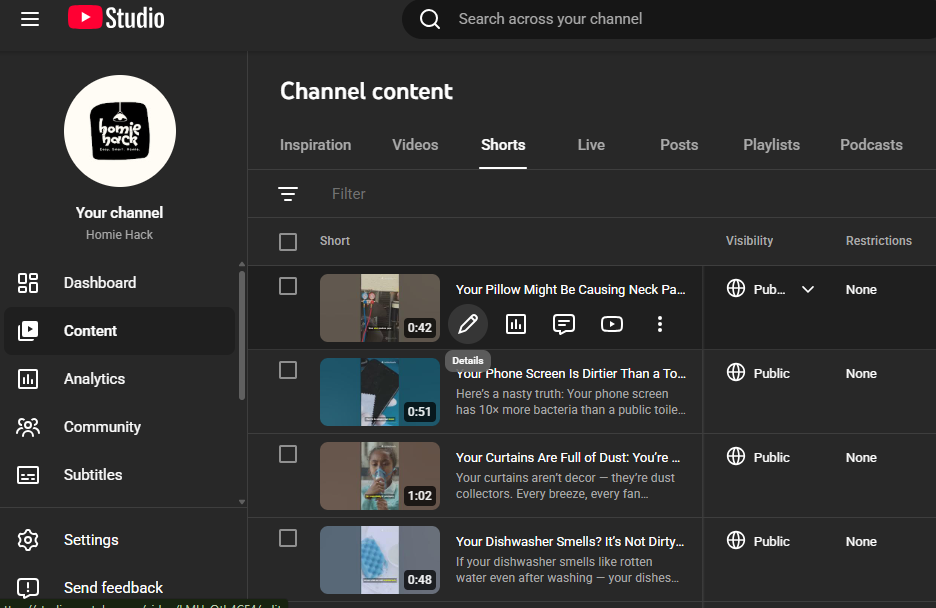
                      • Go to YouTube Studio on your desktop. Select Content Section.
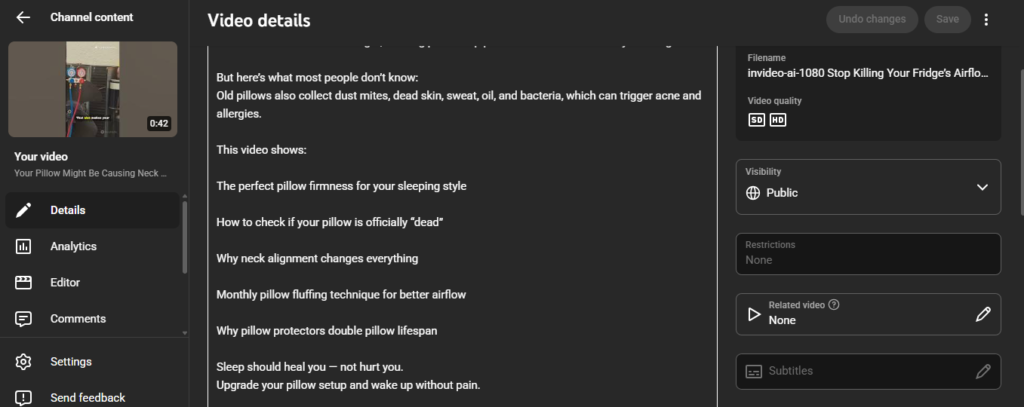
                      • Open the details of your Short.
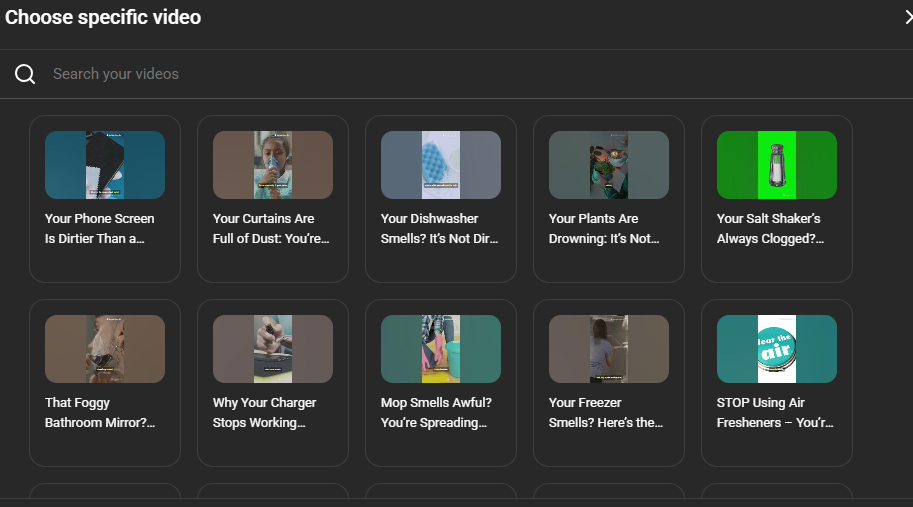
                      • Look for the Related Video tab on the right sidebar.
                      • Link it to your long-form video.

                      Now, a clickable play button appears directly on the Short screen (right under your handle).

                      2. Use a Cliffhanger Cut

                        Don’t give away the ending in the Short. If you show the final result, the viewer has no reason to click through. Instead, cut the Short right before the big reveal. Then, verbally tell them, “Watch the full breakdown here” while pointing to the Related Video link.

                        3. Use a Visual CTA

                          Viewers are often blind to interface buttons because they are focused on your face. In your editing software, add a sticker or a graphic arrow that points exactly to where the Related Video button sits on the screen (bottom right, near the channel name). Time this arrow to pop up exactly when you ask them to watch the full video.

                          4. Community Post Rehook

                            When a Short starts getting views, immediately go to your Community Tab and post the thumbnail of the long-form video you want to push. Add a poll or a question related to that viral Short. Since your Short viewers are currently active on your channel, YouTube is more likely to show them your Community Post. This catches the people who scrolled past the Related Video link but are still interested in the topic.

                            Conclusion

                            The answer is a hard no: the hours you get from the Shorts feed will never fill up that 4,000-hour bar. YouTube has drawn a strict line between scrolling and watching, and those rules aren’t likely to change soon.

                            But getting stuck on this rule is a mistake. YouTube gives you massive reach with Shorts. All you need to do is manually move those viewers over to the videos that actually matter for monetization.